There are several different steps needed to completely remove MacKeeper from your Mac. These are:
Delete MacKeeper from the menu bar
Uninstall the application
Delete the files left behind
Remove browser extensions and cookies
Now we will address each of the steps in detail to make it clearer how to free your Mac of MacKeeper.
Delete MacKeeper from your Mac’s menu bar
Clicking on the menu bar illustrates one of the ways in which MacKeeper makes itself difficult to remove or even stop running. There’s no Quit command. And it doesn’t want you to Force Quit either. So, to delete MacKeeper from your Mac’s menu bar you need to:
Go to your Applications folder and double-click MacKeeper to launch it.
Click on the MacKeeper menu on the left of the menu bar and choose Preferences.
Choose the General tab.
Uncheck the box labeled Show MacKeeper icon in the menu bar.
Quit MacKeeper. Ignore any prompts to activate it or sign up for any services.
Uninstall MacKeeper
Go back to the Applications folder.
Locate the MacKeeper app and drag it to the Trash.
If you’re prompted for your administrator password, type it in and click Ok.
You might then see another pop-up (it’s very persistent) asking whether you are sure you want to uninstall MacKeeper. Type in your username and password again and press Ok.
Once it’s deleted, a window may launch in Safari asking you to complete a survey on mackeeper.com to explain why you uninstalled it. You can either share your opinion or safely ignore it.
How to get rid of the rest of MacKeeper files
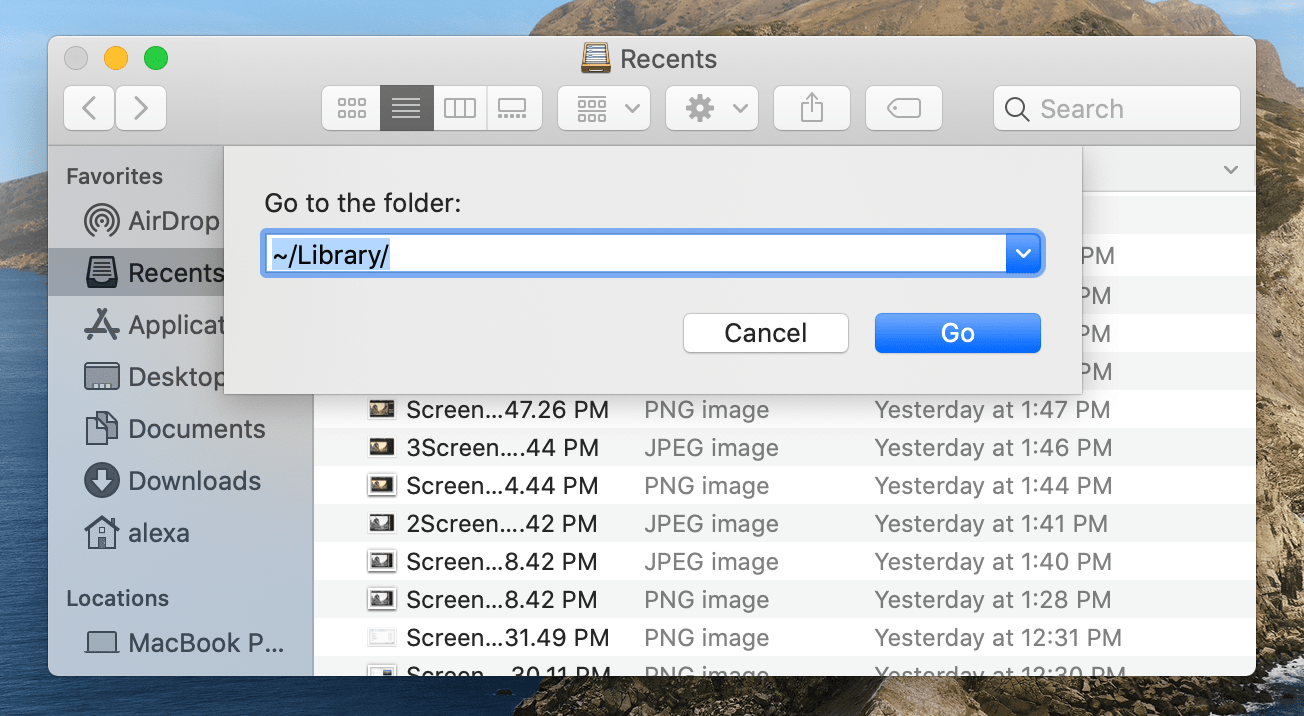
In the Finder, click on the Go menu and type the following into the box: ~/Library
Locate the following files in the Library folder and drag them to the Trash.
/Application Support/MacKeeper Helper (this one is a folder, delete the whole folder)